How to Organize Your Carry-On: Essential Travel Accessories for Stress-Free Security Lines
Carry-on essentials for travel: how to pack for fast security lines in 2026, what TSA asks you to take out, and how to label what you might leave behind.
The short answer
Organize your carry-on in two zones. Up front, a small "checkpoint kit" you can lift out in one move: your quart-size liquids bag and any laptop or tablet. Behind it, everything else in pouches. Then label the things most likely to leave your hands (the bag itself, your laptop, your earbuds case) so whoever finds one can reach you.

Why your carry-on matters more over the holidays
On the Sunday after Thanksgiving 2025 (Nov 30), TSA screened about 3.13 million people (3,133,924, by TSA's own count posted Dec 1, 2025). That was the busiest day in the agency's history. Late December runs close behind.
That's a lot of gray bins, a lot of identical laptops and a lot of people repacking in a hurry at the end of the belt.
Most "I lost it at the airport" stories we hear aren't about checked bags. They're about a laptop left in a bin. AirPods in a seatback pocket. A carry-on gate-checked at the last minute with nothing on it but a paper claim stub. Good organization prevents most of that. A way for a stranger to reach you covers the rest.
What TSA asks you to take out in 2026
Screening rules shift a little every year. Here's where things stand this fall:
- Liquids: 3-1-1 still applies. As of November 10, 2026, TSA's liquids rule page says: containers of 3.4 ounces (100 ml) or less, all in one quart-size bag, one bag per person. Rules can change, so check that page before you fly. Medically necessary liquids, baby formula and breast milk are exceptions. Tell the officer you have them.
- Laptops and tablets: In standard lanes, take out anything larger than a phone and give it its own bin.
- CT scanner lanes: Many big airports now use 3D CT scanners, where liquids and laptops can often stay in the bag. Follow the signs and the officer at your lane. Not every airport has them yet, so pack to lift liquids and laptops out anyway, in case the airport you're flying from doesn't.
- Shoes: Since July 2025, most travelers keep their shoes on. Some airports still use older scanners and may ask you to take them off, so wear shoes that slip off easily.
- Batteries: Spare lithium batteries and power banks go in your carry-on only, not checked luggage.
- ID: You need a REAL ID-compliant license, a passport or another accepted ID. Arriving without one means extra time and a fee at the checkpoint.
TSA PreCheck travelers can usually leave laptops and liquids in place. Everyone else: pack so you can lift them out fast.
How to organize your carry-on, step by step
- Pick one checkpoint pocket. The front pocket or the very top of the main compartment. Your liquids bag and laptop live here and nowhere else. One reach, two items out.
- Pack the liquids bag last, on top. Clear, quart-size, zipped. Bar soap and shampoo bars free up room, since they aren't liquids.
- Put every cord in one pouch. Phone cable, power bank, wall plug, earbuds. If an officer needs a closer look, it's one pouch instead of a tangle.
- Make a separate seat kit. Everything you want during the flight: headphones, snacks, meds, lip balm, an extra layer and an empty water bottle to fill past security. Keep it in a small tote under the seat, so the main bag can go overhead (or get gate-checked) without you digging through it.
- Give documents one fixed spot. ID, passport and boarding pass go in a zip pocket you use for nothing else. Your phone goes back in the same pocket after the scan.
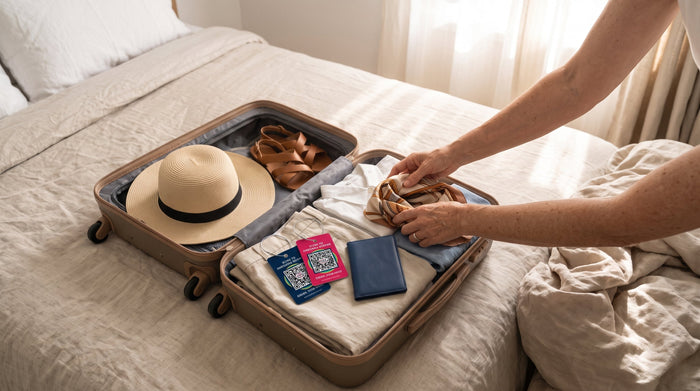
- Roll clothes and fill the gaps. Heavy items near the wheels. Socks inside shoes. Leave a little room for the way home.
- Label what can leave your hands. The bag, the laptop, the earbuds case, the passport cover, your keys. More on this below.
- Do a bin sweep before you walk away. Count your bins and look inside each one. Laptop, liquids, jacket, phone. It takes four seconds.
Your carry-on essentials checklist
- Documents: ID or passport, boarding pass, one card, a little cash.
- Checkpoint kit: quart-size liquids bag; laptop or tablet.
- Power: phone cable, power bank, wall plug, plug adapter for international trips.
- Health: prescription meds in their original containers, plus a day or two extra.
- Comfort: headphones, eye mask, a warm layer, snacks, an empty water bottle.
- Just in case: a spare shirt and underwear, in case a checked bag runs late.
- Contact: a tag or label on anything you'd hate to leave behind.
The step most packing lists skip: a way back to you
Organization lowers the odds of leaving something behind. It doesn't take them to zero. Bins move fast. Gate agents ask for volunteers to check bags. Seatback pockets swallow small things.
When it happens, the outcome mostly depends on one thing: can the person who picks it up reach you?
The old answer was a phone number on a tag. We hear this from customers all the time: "I don't want my phone number on there." Fair enough. A number on a bag is readable by everyone in the boarding line, not just the person who finds it. (Same goes for a home address. Here's what to put on a luggage tag, and what to leave off.)
Here's what we'd put where:
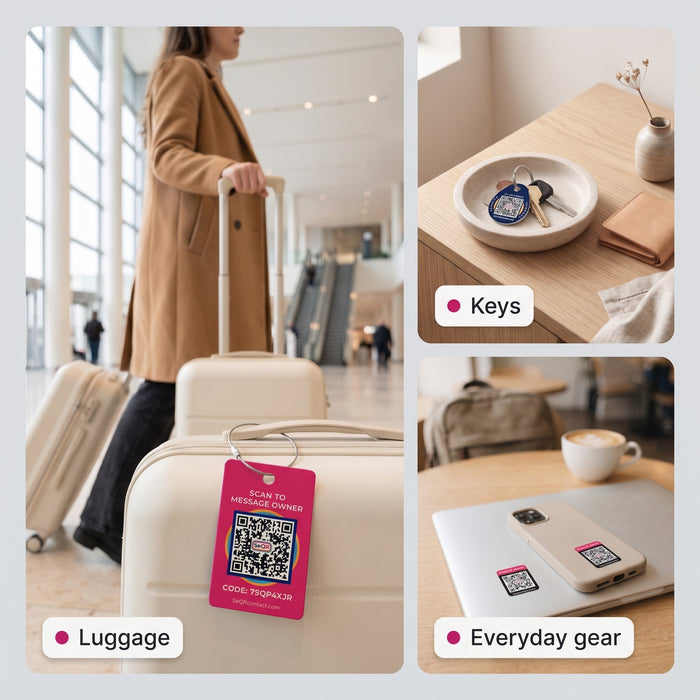
- Your carry-on: one of our Smart Luggage Tags on the handle. It has a braided steel cable loop with a screw-lock barrel, so it stays put through a gate check.
- Laptop, earbuds case, passport cover: Lost Item Labels. Small QR stickers for hard surfaces, which are exactly the things that end up in bins and seatback pockets.
- Keys: a Smart Keychain Tag, so the keys you need at the parking lot when you land have a way home too.
- All of the above: the SeQR Starter Set has two luggage tags, two keychain tags and six labels.

What the finder sees
The finder points any phone camera at the code. A web page opens with your note and a box to send you a message. They don't need to download anything. You get a notification in the free SeQR app and can write back, and neither of you sees the other's phone number. If they choose to, they can share where they are, depending on their phone's settings. (Here's a closer look at what a finder sees.)

Change the message for the trip
This is the part a printed or engraved tag can't do. Each tag has its own QR code that stays the same, but the message behind it is editable any time. Before a holiday flight, you might change it to:
"Thanks for finding this! If I'm returning to the airport for it, or if it's lost there, please give it to the gate agent so they can hold it, or message me here."
Back home, switch it back. Same tag, new message in seconds.
What to leave out of your carry-on
- Full-size toiletries over 3.4 ounces. Check them or buy them when you land.
- Box cutters, utility knives and loose razor blades.
- Wrapped gifts. Officers may need to look inside, so wrap at your destination.
- Your home address and phone number on any outside tag.
Frequently asked questions
Do I still have to take liquids out of my carry-on in 2026?
In standard lanes, usually yes. The 3-1-1 rule still applies, and you may be asked to put your quart-size bag in a bin. At lanes with CT scanners, and in TSA PreCheck lanes, liquids can often stay in the bag. Follow the instructions at your lane.
Can I keep my shoes on at TSA security?
Most travelers can. TSA ended its standard shoes-off requirement in July 2025. An officer can still ask you to remove them if needed, and if an airport still uses older screening technology that requires shoes off, you'll need to take them off when asked.
Can I put a power bank in my checked bag?
No. Spare lithium batteries and power banks belong in your carry-on. If your carry-on gets gate-checked, take them out and keep them with you. Some airlines set their own limits, so check yours.
What should I do if my carry-on gets gate-checked?
- Take out power banks, spare batteries, medications, ID and anything valuable.
- Make sure a contact tag is on the handle, not just the paper claim stub.
- Snap a quick photo of the bag in case you need to describe it.
Does the person who finds my bag need an app?
No. Any phone camera can scan a SeQR code. It opens a web page where they can message you. Only you use the free SeQR app, which installs from your browser rather than the App Store or Google Play. There's no subscription.
Heading out for the holidays? Put one of our Smart Luggage Tags on your carry-on, or get the SeQR Starter Set to cover your bag, your keys and your laptop in one go.
How a SeQR tag gets your things back
- 1Someone finds itThey point any phone camera at the tag. No app needed.
- 2They message youThey see your note and a message box, not your number or address.
- 3You reply and get it backYou get the message right away and agree where to meet.
 Smart Luggage TagsNo app for the finder, no battery, no monthly fees.See the product →